← Back to Course
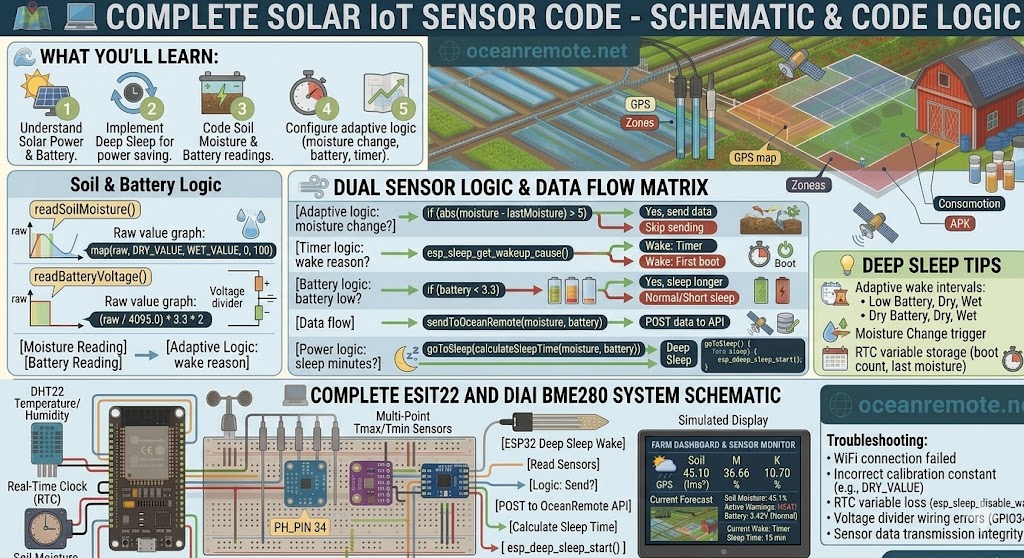
Complete Working Code
💻 Complete Solar IoT Sensor Code - Battery-Powered Soil Monitoring
💻 What You'll Learn:
- 🔋 Run your soil sensor for months on a single battery charge
- ⚡ Use deep sleep to wake, read, send, and sleep again
- 📊 Adjust sleep interval based on conditions (dry = check more often)
- 🔋 Monitor battery voltage and extend life when low
⚡ How Solar IoT Works
⏰ Wake → 📊 Read Sensor → 📡 Send Data → 😴 Deep Sleep (15 min) → 🔁 Repeat
Total active time: ~3 seconds | Power saved: 99.9%
💡 Power Savings Breakdown:
- 📡 Always on WiFi: 170mA × 24h = 4,080mAh/day → Battery dead in 1 day
- 😴 Deep sleep (15 min wake): 170mA × 3s + 0.01mA × 897s = 0.15mAh/cycle → Battery lasts 6+ months
📖 Complete Solar Sensor Code
#include <WiFi.h>
#include <HTTPClient.h>

const char* ssid = "YOUR_WIFI";
const char* password = "YOUR_PASSWORD";
const char* token = "YOUR_TOKEN";

#define SOIL_PIN 32
#define BATTERY_PIN 34

const int DRY = 3800, WET = 1500;
RTC_DATA_ATTR int bootCount = 0;
RTC_DATA_ATTR int lastMoisture = 0;

// ========== READ SENSORS ==========
int readSoil() {
    int m = map(analogRead(SOIL_PIN), DRY, WET, 0, 100);
    return constrain(m, 0, 100);
}

float readBattery() {
    int raw = analogRead(BATTERY_PIN);
    return (raw / 4095.0) * 3.3 * 2;  // Voltage divider: 2x
}

// ========== SEND TO CLOUD ==========
void sendData(int moisture, float battery) {
    WiFi.begin(ssid, password);
    int tries = 0;
    while (WiFi.status() != WL_CONNECTED && tries < 20) {
        delay(200);
        tries++;
    }

    if (WiFi.status() == WL_CONNECTED) {
        HTTPClient http;
        http.begin("https://api.oceanremote.net/device/state");
        http.addHeader("Content-Type", "application/x-www-form-urlencoded");

        String data = "token=" + String(token);
        data += "&soil=" + String(moisture);
        data += "&battery=" + String(battery);
        http.POST(data);
        http.end();

        WiFi.disconnect(true);
        WiFi.mode(WIFI_OFF);
    }
}

// ========== SMART SLEEP ==========
int getSleepMinutes(int moisture, float battery) {
    if (battery < 3.3) return 60;      // Low battery → sleep longer
    if (moisture < 30)  return 5;       // Very dry → check often
    if (moisture > 70)  return 30;      // Very wet → check less
    return 15;                          // Normal → 15 min
}

// ========== SETUP ==========
void setup() {
    Serial.begin(115200);
    bootCount++;

    int m = readSoil();
    float v = readBattery();

    Serial.printf("Wake #%d | Soil: %d%% | Battery: %.2fV\n", bootCount, m, v);

    // Send only if changed or every 10th reading
    if (abs(m - lastMoisture) > 5 || bootCount % 10 == 0) {
        sendData(m, v);
        lastMoisture = m;
    }

    int sleep = getSleepMinutes(m, v);
    Serial.printf("💤 Sleep %d min\n", sleep);

    esp_sleep_enable_timer_wakeup(sleep * 60 * 1000000ULL);
    esp_deep_sleep_start();
}

void loop() {}
🔋 Key Power-Saving Techniques
- 😴 Deep sleep (2.5μA): ESP32 consumes almost nothing between readings
- 📡 Disable WiFi after sending:
WiFi.disconnect(true); WiFi.mode(WIFI_OFF); - 📦 Batch data: Send only when moisture changes significantly (>5%)
- ⏱️ Send less often: Wet soil? Sleep 30 min. Dry soil? Sleep 5 min.
- 🔋 Use RTC memory:
RTC_DATA_ATTRpreserves variables across deep sleep
⚠️ Solar Sensor Mistakes:
- ❌ Leaving WiFi on after sending data → Battery dead in 2 days
- ❌ Reading sensors every minute → No time to sleep
- ❌ Not using deep sleep → Same battery life as always-on
- ❌ Forgetting
RTC_DATA_ATTR→ Variables reset each wake
📖 Real Results - Kenyan Farm:
3 solar sensors installed in remote field with no electricity:
- 🔋 2600mAh battery + 6V 2W solar panel
- ⏰ Wake every 15 minutes → send data → deep sleep
- 📈 Result: Running continuously for 8+ months without battery change
🎯 Quick Reference:
- ⚡ Active time: 2-3 seconds per cycle
- 😴 Deep sleep: 2.5μA (almost zero)
- 📡 WiFi on: 170mA → Turn off immediately after sending
- 🔋 Battery life: 6-12 months on 2600mAh
- 💾
RTC_DATA_ATTR= survives deep sleep
💡 Key Takeaways:
- Apply these concepts directly to your farm or project.
- Take notes on important details for the quiz.
- Use the button below to track your progress.
×
![Enlarged view]()